Author: tharangadilshani

  • The ROI of CRM Systems: Is It Worth the Investment?

    The ROI of CRM Systems: Is It Worth the Investment?

    Why KSA/UAE companies see CRM as a way to make money, not just a cost

    If your business in the KSA/UAE is growing, you’ve definitely heard the phrase “CRM” more than once in the last year. A vendor may have pitched you, or your sales manager may have asked about it. You might have seen your competitors use one and thought you were falling behind.

    But before you do anything, you need to address a very important question: Is it truly worth it to buy a CRM system?

    When you look at real-world facts, the answer isn’t simply “yes.” It’s a loud “yes.” CRM systems are no longer merely for keeping track of contacts. They are now what makes sales teams work well, operations that focus on the customer, and strategic decision-making possible.

    The concept of CRM ROI is crucial for businesses looking to evaluate their investments in customer relationship management systems.

    In this blog, we’ll talk about the ROI (Return on Investment) of CRM systems, especially ones like ZOHO CRM. We’ll also discuss why smart KSA/UAE businesses of all sizes regard them as important growth drivers and how understanding the CRM ROI can impact their success.

    What Exactly Is a CRM System?

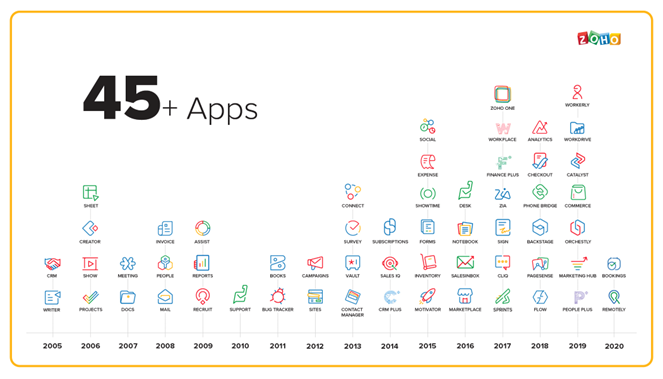
    A CRM (Customer Relationship Management) system is a type of software that helps organizations keep track of their interactions with leads, prospects, and current customers. But current CRMs, such as ZOHO CRM, do more than just keep track of contacts.

    They give:

    • Keeping track of the sales pipeline
    • Automated lead nurturing
    • Business analytics and insights in real time
    • Managing customer service
    • Automating marketing
    • Integration with WhatsApp, email, and social media

    A CRM basically brings together and makes all of your money-making operations easier.

    The ROI of CRM Systems: Is It Worth the Investment? 3

    Understanding CRM ROI: It’s Not Just About Saving Money, It’s Also About Making Money

    In conclusion, understanding CRM ROI is essential for companies to maximize their investment in CRM systems.

    There are two major ways to find out how much money a CRM system makes: it helps you manage leads better, close deals faster, and get more money in.

    Cost Efficiency: Less time spent on manual tasks, less missed opportunities, and better sales efforts. Let’s get into further detail.

    1. Sales that work better
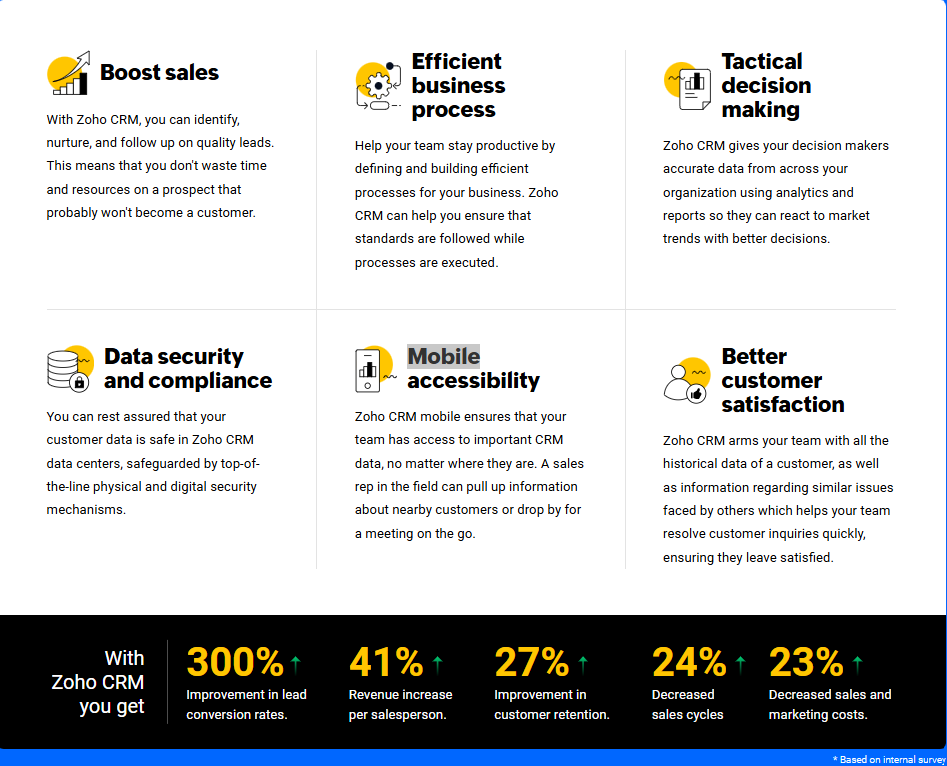
    Salesforce says that companies that employ CRMs might see sales go up by as much as 29% and productivity go up by as high as 34%. Why?

    • Automated follow-ups make sure you don’t miss any chances.
    • You can prioritize hot leads when you can see the pipeline clearly.
    • Salespeople spend less time on paperwork and more time selling.

    A trade company in Sharjah used ZOHO CRM to make their sales process faster and easier to see, which decreased their average sales cycle by 21%..

    2. Keeping customers longer means making money in the long run.

    It can cost five times as much to get a new customer as it does to keep an old one. CRM systems help you:

    • Keep track of past interactions
    • Make communication more personal
    • Answer support questions more quickly
    • Upsell and new product introduce to existing clients 
    • Give out loyalty programs and deals

    What happened? More money coming in from repeat customers and less people leaving.

    Real ROI: If you keep just 5% more customers, your profits could go up by 25% to 95% (Source: Bain & Company).

    3. Higher rates of converting leads

    Companies can do the following with ZOHO CRM:

    • Give leads points based on how they act
    • Set up automated nurturing sequences
    • Set up follow-ups at the proper time

    This means that you will sell more, but also sell smarter.

    For example, an HR services startup in the KSA/UAE saw their lead-to-client conversion rate go from 11% to 19% three months after they started using CRM. That’s almost twice as much return on their marketing investment.

    4. Making decisions faster using real-time data

    Without a CRM, people who make decisions have to use old Excel sheets or talk to each other to get updates.

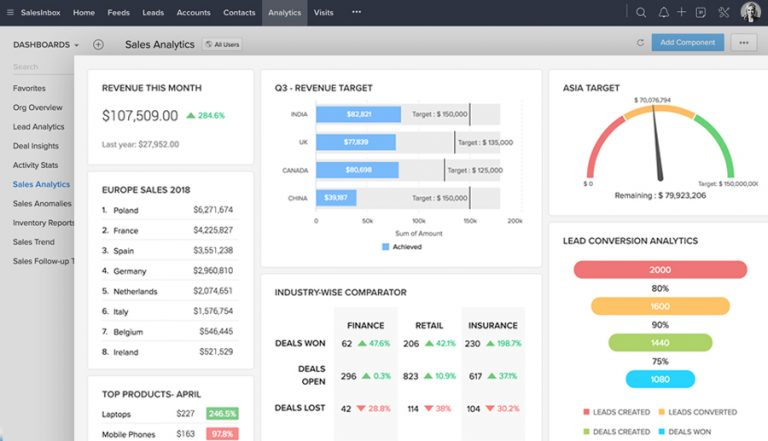
    • You receive realtime dashboards with ZOHO CRM, not reports that are late.
    • You can keep an eye on KPIs as they happen.
    • You learn what works and what doesn’t.

    Executive ROI: Making choices faster and based on data leads to stronger strategy and more accurate predictions.

    5. Saving time means saving money.

    Time is one of the most important things your business has. CRMs like ZOHO get rid of:

    • Entering data by hand
    • Follow-ups that happen over and over again
    • Sales reps are confused about who is in charge of which lead.

    This saves hundreds of hours of work per year.

    Time ROI: If your team of 5 salesmen saves 1 hour a day, that’s more than 1,200 hours a year, which is more than AED 100,000 in pay savings.

    6. Better teamwork between teams

    A CRM brings together your:

    • Sales staff (keeping track of deals)
    • Marketing team (targeting and campaigns)
    • Support team (managing cases)
    • Team in charge of money (renewals and payment reminders)

    When everyone uses the same data, working together is easy and productive.

    Team ROI: No duplication, fewer delays, and a better experience for all customers.

    7. Infrastructure that may grow with your business

    Your firm can grow using CRMs. You can start with a small group and then add more departments or locations as you develop. You can do the following using ZOHO CRM:

    • Adding users is easy
    • Modules that are made just for you
    • Connecting with other products, such Zoho Books, WhatsApp, and KSA/UAE SMS gateways

    Growth ROI: You don’t have to upgrade your systems every two years; your CRM grows with you.

    But how much does it cost?

    Let’s talk about the big question: how much does a CRM system truly cost, and is it worth it?

    Prices for ZOHO CRM:

    • Free for teams of three or fewer
    • Plans that cost as little as a few dirhams per user per day
    • Add-ons that can be changed based on the size and complexity of the business

    ZOHO CRM is one of the most affordable platforms for small and medium-sized businesses (SMEs) in the KSA/UAE. It costs less than Salesforce or HubSpot, which can cost thousands of dollars a month. 

    A Simple Way to Figure Out CRM ROI

    • For example, your business makes AED 2 million a year.
    • You put ZOHO CRM into action for AED 10,000 a year.
    •  You only need to raise conversion rates and retention by 10%.

    That’s an extra AED 200,000 in sales, which is 20 times what you spent on your CRM.

    And that’s not even taking into account the time saved, improved customer service, or higher production.

    Why KSA/UAE Companies Are Putting Money into CRM Right Now

    • Digital transformation is a top priority for the country:  The KSA/UAE government supports automation and growth based on data.
    • Cloud-based tools are necessary for remote and hybrid teams:  You may access CRMs from anywhere.
    • Customer expectations are higher than ever. Response time, customisation, and follow-up are all very important.

    Not using a CRM in this situation is not only a waste of time, it’s also dangerous.

    What Happens If You Don’t Have a CRM?

    Do you still use spreadsheets, email chains, or notes that are all over the place? 

    This is what it will cost you:

    • Leads that were missed
    • Follow-ups that were not responded
    • Customer experiences that don’t correlate
    • Not being able to see sales results well
    • Burnout and inefficiency in teams

    The longer you wait to use CRM, the more growth opportunities you’re missing out on.

    Why ZOHO CRM? And why now?

    We think ZOHO CRM is the best choice for KSA/UAE businesses because it is:

    • Cheap and easy to put together
    • Made for businesses that buy and sell, provide services, and do business with other enterprises
    • Can be changed to fit Arabic and KSA/UAE-specific workflows
    • With the help of our local experts for implementation and support

    We don’t only sell software.  We design the system to fit your business strategy, so it starts making money right away.

    Final Decision: Is CRM a Good Investment?

     Yes, without a doubt.

    But only if:

    • But only if the CRM is correct, like ZOHO CRM for enterprises in the KSA/UAE.
    • It is put into action with skill and planning.
    • Your team is trained and on the same page.

    CRM isn’t simply a tool; it’s the most important part of a modern corporation.  The return on investment (ROI) extends beyond the figures; it includes the competitive edge you receive and the potential to keep your business going for a long time.

    Want to know what CRM can do for your business?

    We can help you:

    • Find out how much money you may make back
    • Make a business case for being a leader
    • Set up ZOHO CRM to fit your business needs

     +971 561 289 803
     sales@quintsn.com
     www.quintessentialtech.com

    Let’s build your growth strategy – powered by data, driven by ZOHO.
  • How to Create Custom Fields in SAP Business One

    How to Create Custom Fields in SAP Business One

    Adding custom fields in SAP Business One is an incredibly valuable way for businesses to capture critical, unique data specific to their operations. While the standard application is designed to handle common data entry fields used across various industries, every company has specific information needs that are vital for their business or sector. Capturing this unique data is essential for generating more insightful and tailored analytics.

    This is where SAP Business One truly shines, offering a simple yet sophisticated built-in feature for creating custom fields. These fields can be seamlessly added to most transaction and master data screens, empowering businesses to extend the system’s capabilities and tailor it to their exact requirements.

    Follow these steps to get started:

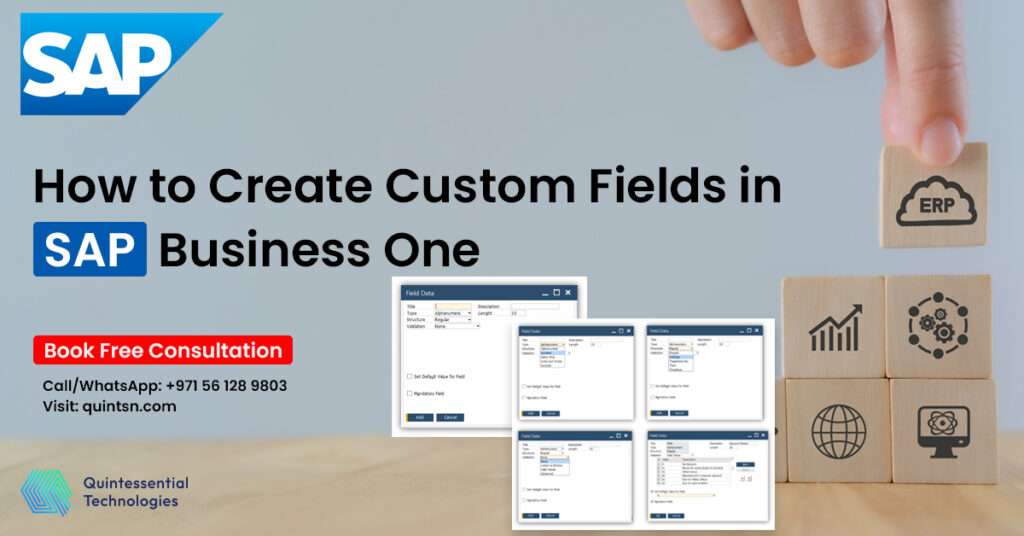
    1. Navigate to User-Defined Fields Management
    Go to Tools > Customization Tools > User-Defined Fields Management.

    2. Choose the Module and Object
    Select the module (e.g., Sales, Inventory, Purchasing) and the specific object where you want to add the field.

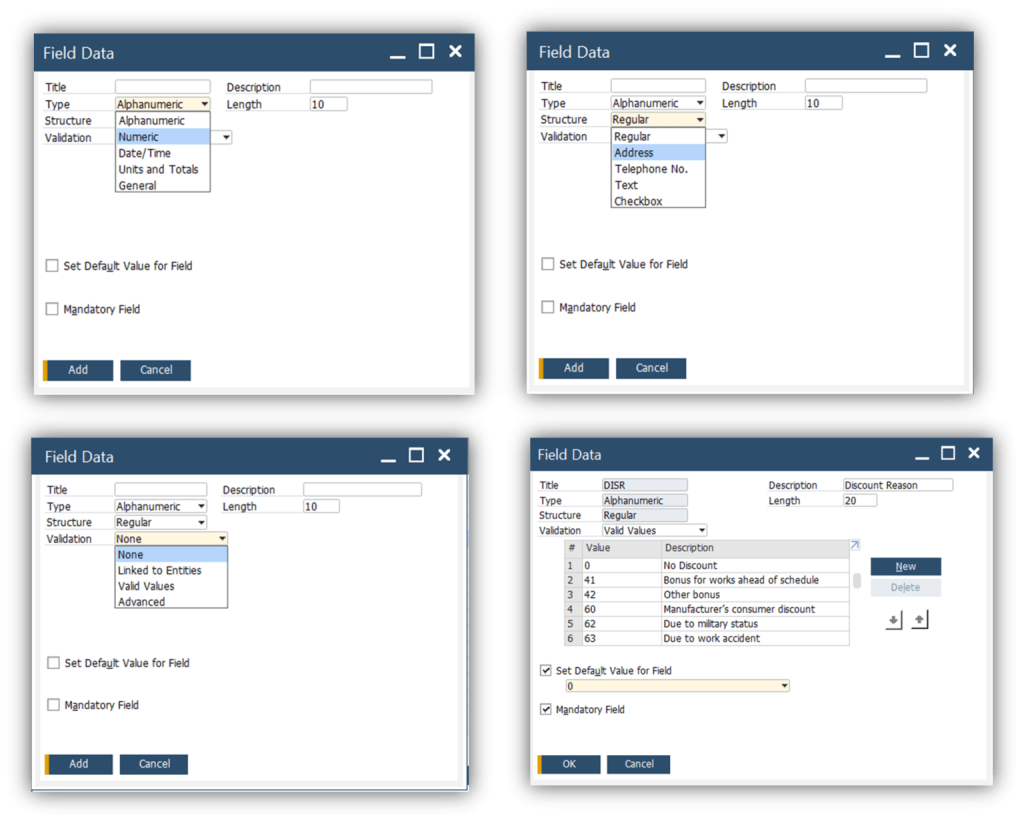
    3. Define the Field

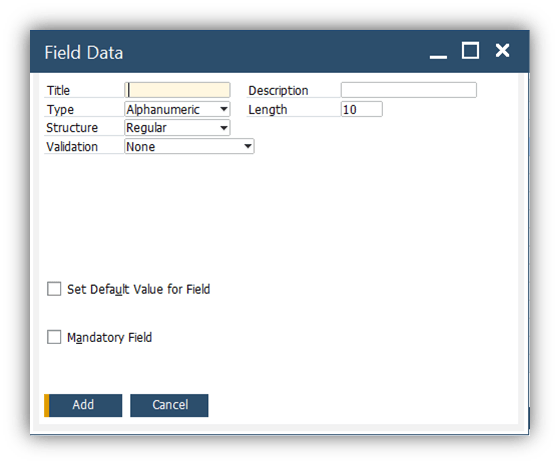
      • Field Name: Provide a name that clearly describes the field’s purpose.
      • Field Type: Choose the appropriate type (e.g., alphanumeric, date, numeric).
      • Field Length: Set the character limit, if applicable.

    4. Activate the Field
    Save your changes, and the custom field will appear on the designated form.

    Best Practices for Using Custom Fields

    To maximize the benefits of custom fields, keep these best practices in mind:

    1. Plan Before You Create
      Before adding custom fields, identify your business needs and define what data is essential to capture. Avoid creating unnecessary fields that could clutter forms and confuse users.
    2. Use Naming Conventions
      Adopt a consistent naming convention to ensure clarity and avoid duplication. For example, prefix fields with the module or department they belong to (e.g., Sales_WarrantyPeriod).
    3. Test Before Deployment
      Test new custom fields in a sandbox environment to ensure they work as expected and integrate smoothly with existing processes.
    4. Document Your Changes
      Maintain documentation for all customizations, including the purpose and details of each custom field. This will be helpful for training new employees and troubleshooting issues.
    5. Regularly Review Fields
      Periodically review your custom fields to ensure they remain relevant. Remove or repurpose fields that are no longer useful.

    Real-Life Use Cases of Custom Fields

    1. Inventory Management
      A manufacturing company added a custom field to track the production batch number of each item. This data was later used for better traceability and compliance reporting.
    2. Customer Service
      A retail business created custom fields to capture customer preferences, such as preferred delivery times and packaging options, resulting in improved customer satisfaction.
    3. Financial Reporting
      A consulting firm added a project code field to its sales orders, enabling accurate tracking of revenue by project and streamlining financial reporting.

    Conclusion

    Custom fields in SAP Business One are a powerful tool for personalizing your ERP system to meet unique business needs. By capturing additional data points, you can enhance workflows, improve decision-making, and unlock new levels of operational efficiency.

    With careful planning and best practices, custom fields can transform your SAP Business One experience, ensuring your ERP system grows alongside your business.

    Start exploring the possibilities of custom fields today and take control of your data like never before!

    Contact Quintessential for more information and assistance on SAP Business one custom fields.

  • What Meta has confirmed so far

    What Meta has confirmed so far

    The clearest public signal is that Meta is trying to balance two things at once:

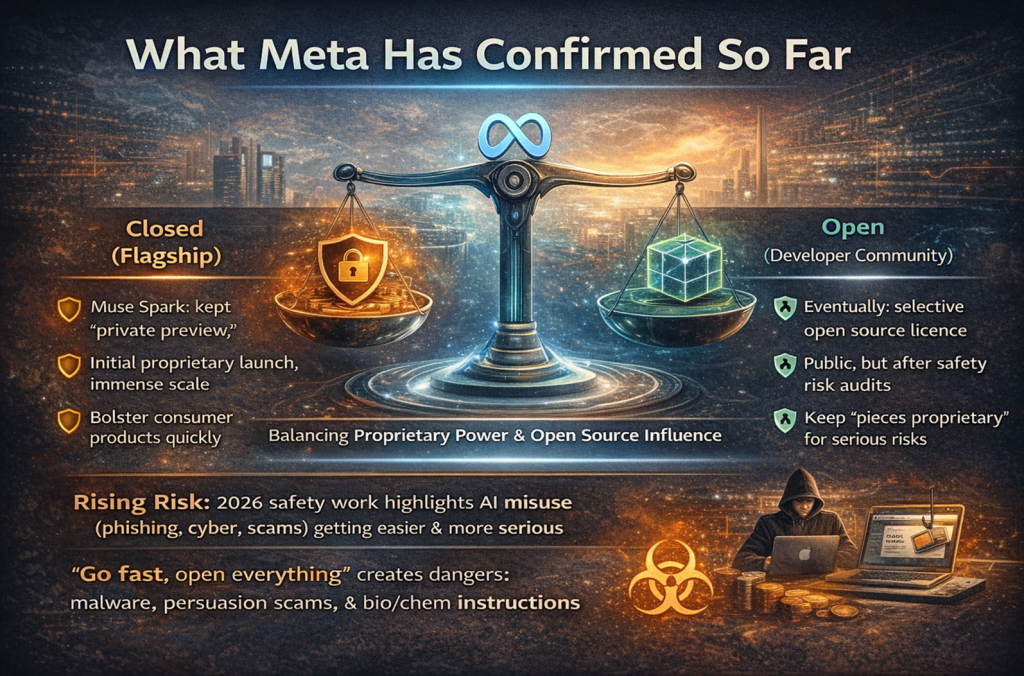
    First, Meta wants a flagship model line that can power its consumer products at enormous scale and Meta is willing to keep those models more closed at launch than it did in earlier Llama eras. With Muse Spark, Meta shifted away from immediate open release by offering a limited “private preview” and keeping technical specifics private. 

    Second, Meta still wants to remain a major “open” player. Reporting states Meta intends to eventually offer versions under an open source licence, but only after evaluating safety risk   and by keeping “some pieces proprietary,” Meta can reduce the chance that open releases create new misuse pathways. This fits a broader industry reality highlighted by major safety work in 2026: general purpose AI capabilities are improving fast, but risks (misuse, malfunctions, systemic disruption) are rising too   especially for cyber abuse and harmful knowledge. “Go fast, open everything immediately” is harder to justify when models can be used for advanced malware, persuasion scams, and more. 

    The “open source” catch: what “open” will likely look like in 2026

    Let’s keep it simple, : “open source AI model” can mean different things.

    In practice, most “open” AI releases are open weights (you can download model weights), not fully open like traditional software where everything is reproducible from source code + dataset. That said, licenses matter a lot.

    A key reference point is Llama 4, which was released with weights and broad commercial use rights but still under a community licence with restrictions (for example, the multimodal Llama 4 licence terms described by Microsoft’s model catalogue include EU related restrictions for certain rights grants).

    In contrast, Gemma 4 from Google was explicitly released under the Apache 2.0 licence, a widely used permissive open source licence that is designed for broad commercial flexibility. 

    So when Meta says “open source versions later,” the realistic, business shaped interpretation is:

    • The first release of the most capable model(s) may stay closed (or partially closed) while Meta validates safety outcomes and performance in the wild. 
    • The later “open” releases may be smaller, distilled, or have capability limits, with some components (filters, agent tooling, specialised safety layers) held back. 
    • The result is an ecosystem where developers can build locally on open weights, but still rely on paid APIs for the “best” frontier capabilities. (This pattern is consistent with how many vendors balance developer adoption and monetisation.) 

    Avocado and Mango: what’s known, what’s reported, and what’s still unclear

    A lot of the public chatter uses “Avocado” and “Mango” like official product names. They are better understood as internal codenames used in reporting   and those can change anytime.

    Here’s what strong, recent reporting supports:

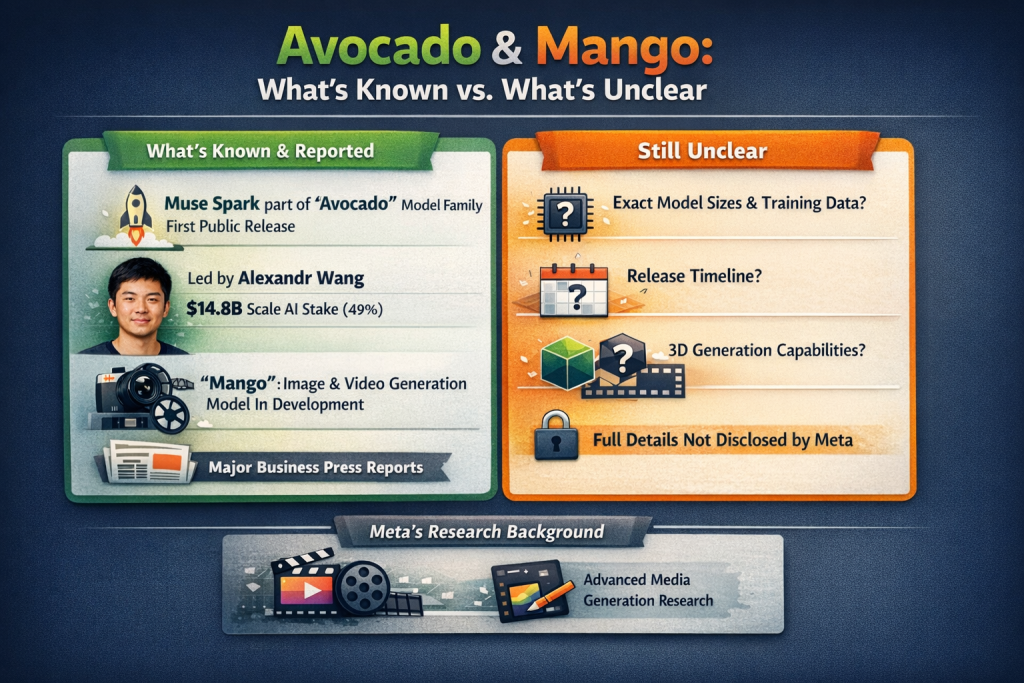
    Muse Spark is described as part of an internal series called “Avocado,” and it is the first public model release from Meta’s rebuilt superintelligence effort. 

    The new effort is led by Alexandr Wang, who joined Meta after a deal in which Meta agreed to take a 49% stake in Scale AI for about $14.8 billion (reported June 2025). 

    Separately, reporting has described “Mango” as an image/video focused model in development. Because some primary articles are paywalled, the safest phrasing is: major business press has reported Meta is working on a model code named “Mango” focused on image and video generation, alongside “Avocado” as a text model family. 

    What is not publicly confirmed in detail (so don’t overclaim in your blog):

    • Exact parameter sizes, training data scope, or a firm release calendar for future “Avocado” or “Mango” variants. Meta avoided disclosing core details even for Muse Spark. 
    • Claims like “natively generates 3D assets” for Mango, this may be plausible long term, but it’s not backed by the strongest public reporting in the sources above. 

    One important nuance: Meta does have a serious media generation research history. For example, Meta’s Movie Gen research (2024) described generating HD video with synchronised audio and capabilities like editing and personalisation showing Meta has worked on video+audio generation even if “Mango” product details aren’t public. 

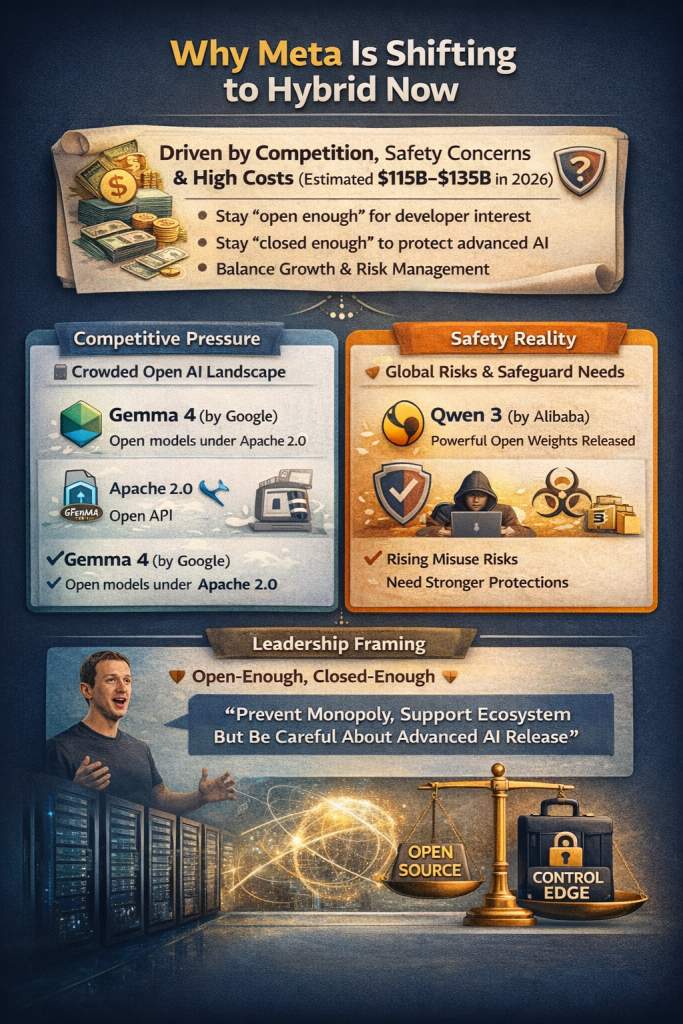
    Why Meta is shifting to hybrid now

    This change is not happening in a vacuum. It’s being pushed by competition, safety pressure, and money (a lot of money).

    Meta’s open releases brought huge adoption, but keeping pace at the frontier is expensive. Meta has publicly guided 2026 capital expenditures in the range of $115–$135 billion, explicitly tying the growth to infrastructure investment supporting “Meta Superintelligence Labs” and the core business.
    At the same time, the “open model” landscape is more crowded. Two examples that matter for Meta’s positioning:

    • Gemma 4 is positioned as a family of open models released under Apache 2.0 (commercially permissive), which reduces friction for businesses that want legal clarity. 
    • Qwen3 publicly stated it released model weights (including MoE variants) under Apache 2.0, putting additional pressure on western labs to offer competitive open options. 

    Add to this the safety reality: major international safety work in 2026 explicitly documents misuse risks (scams, manipulation, cyberattacks, bio/chem information) and notes that developers have been adding safeguards when models cross new capability thresholds. 

    Finally, leadership framing matters. Meta CEO Mark Zuckerberg has argued that open-source AI helps prevent power concentrating in a small number of companies and supports a broad ecosystem   but he has also acknowledged that very advanced systems may require being careful about what is released openly. 

    In short: Meta wants to stay “open enough” to keep developer mindshare, while being “closed enough” to protect its frontier edge and manage risk.

    What this means for developers and businesses

    If you’re building on Meta models (or any open model), 2026 is moving toward a two tier world. Not good or bad, just reality.

    Expect a tiered ecosystem

    The pattern that appears to be emerging is:

    • Open models for: local hosting, cost sensitive workloads, private deployments, custom fine tuning, and fast iteration. (This is why open model ecosystems became so popular in the first place.) 
    • Proprietary models/APIs for: peak reasoning, premium multimodal workflows, agentic task execution, and features tightly integrated with big consumer platforms. Muse Spark itself launched with private preview access rather than immediate open

    “Agentic AI” is not just hype it’s becoming productised

    Muse Spark includes modes designed around deeper reasoning and multi agent execution (Meta described “Contemplating Mode” as running multiple agents simultaneously). That’s a direct signal that “AI that acts”   not just “AI that chats”, is a near term product direction. This direction also increases governance needs. The International AI Safety Report explicitly categorises risks from malicious use (fraud, manipulation, cyber), malfunctions, and systemic impacts   and warns evidence is growing even as capability progress remains jagged. 

    Practical checklist for teams right now

    If you want to write a blog that brings leads, give readers a clear “do this next” list (simple English, can follow one):

    • Decide which workloads must stay on‑prem or inside your VPC (privacy, compliance, sensitive business data). 
    • Build an evaluation harness now (quality, hallucinations, refusal behaviour, data leakage risk). Real world performance can differ from benchmarks. 
    • Plan procurement: open models reduce vendor lock in, but frontier APIs can still be necessary for top tier outputs. 
    • Don’t ignore licensing. “Open” licences vary a lot: Apache 2.0 is very permissive, while community licences may include restrictions.

    A Dubai based business angle: how to turn this news into ROI

    If your goal is more website traffic and more qualified leads, your blog should connect global AI news to local business problems:

    • “How do I cut manual work?”
    • “How do I automate support and operations without leaking data?”
    • “How do I add AI to ERP, CRM, inventory, finance, HR?”
    • “How do I keep cost predictable if AI prices change?”

    This is exactly where Quintessential Tech positions itself: business technology consulting beyond ERP, with services spanning consultancy, implementation/support, development, digital marketing, and AI solutions and the company is headquartered in Dubai. 

    A strong lead friendly angle for your site is: “Hybrid AI means you can run ‘open’ locally for day to day work, and use premium models only when needed. We help you design that architecture safely.” This aligns with the direction Meta is signalling (closed first for flagship, open later for broader ecosystem). 

    Practical CTA wording that fits your homepage style:

    Add a mid article CTA box:

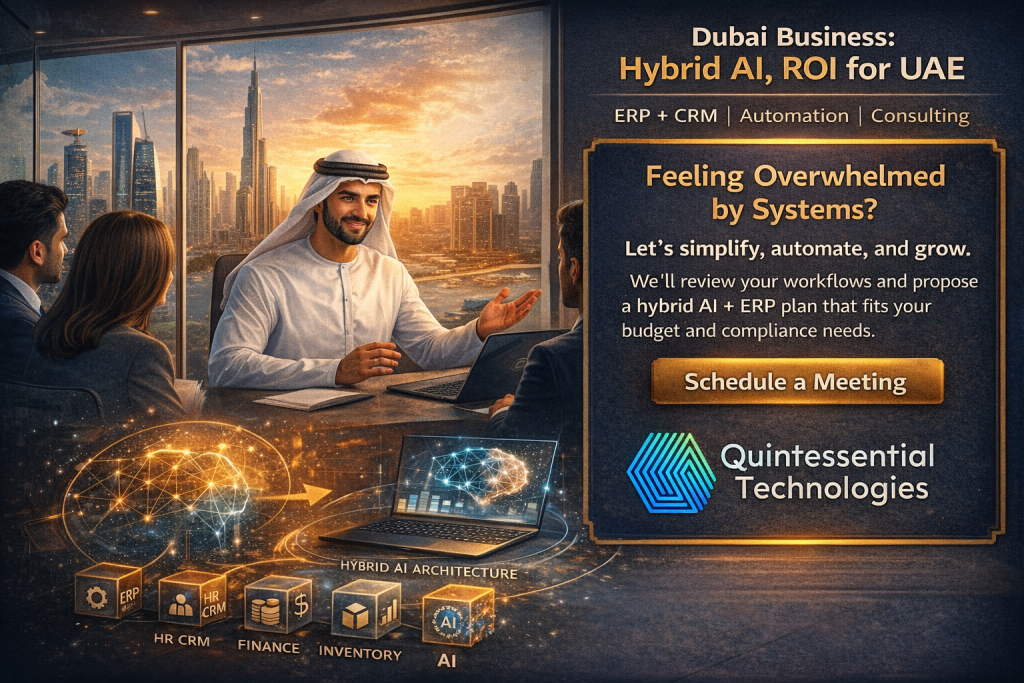
    Feeling overwhelmed by systems?
    “Let’s simplify, automate, and grow. We’ll review your workflows and propose a hybrid AI + ERP plan that fits your budget and compliance needs.” Then use the same button text you already use on the site: “Schedule a Meeting”. 

    FAQ people are searching right now

    Will Meta actually open source its next AI models?

    Reporting on 6 April 2026 said Meta plans to eventually offer versions under an open source licence, but expects to keep some pieces proprietary first to manage safety risk

    Is Muse Spark open source?

    No   not at launch. Meta released Muse Spark through its app and website and offered only a private preview to partners, signalling a shift away from immediate open releases for its newest flagship model line.

    What is the “Avocado” model?

    Muse Spark is described as part of an internal series called “Avocado,” built by Meta’s new superintelligence team.

    What is “Mango” in Meta AI news?

    Major press reporting has described “Mango” as a code name for an image/video focused model under development. Specific capabilities and timing are not confirmed in public technical detail. 

    Why is everyone talking about Gemma 4 and Apache 2.0?

    Gemma 4 was released under the Apache 2.0 licence, which is commercially permissive and reduces licensing friction for businesses, one reason it has become a major talking point in the open model ecosystem.

  • Empowering Decision-Making with SAP Business One Alert Management

    Empowering Decision-Making with SAP Business One Alert Management

    In today’s fast-paced business environment, staying on top of critical activities and decisions is essential for success. However, manually monitoring every process across departments can be time-consuming and error-prone. This is where SAP Business One Alert Management comes into play, offering businesses a powerful tool to automate notifications and ensure timely actions.

    In this blog, we’ll explore how the Alert Management feature in SAP Business One works, its benefits, and how you can use it to proactively manage your business operations.

    What is SAP Business One Alert Management?

    Alert Management in SAP Business One is a feature that automatically monitors predefined conditions in your ERP system and triggers notifications when those conditions are met. These alerts can be sent via email, SMS, or displayed directly within the SAP Business One interface.

    This feature ensures that users are always informed of critical business events, such as overdue invoices, stock shortages, or price changes, without having to manually check for updates.

    Key Features of Alert Management

    1. Predefined and Custom Alerts

    SAP Business One comes with a variety of predefined alerts, but you can also create custom alerts to meet your specific needs. For example, you can set an alert to notify the sales team when a customer exceeds their credit limit.

    2. Real-Time Notifications

    Alerts are triggered in real-time, ensuring that key stakeholders can take action immediately when an issue arises.

    3. Flexible Delivery Options

    Choose how alerts are delivered: via email, SMS, or as a system notification. This flexibility ensures that critical updates reach the right people, no matter where they are.

    4. Wide Applicability

    Alerts can be configured for almost any module in SAP Business One, including sales, purchasing, inventory, and finance.

    5. Role-Based Notifications

    Assign alerts to specific users or roles to ensure the right people receive the information they need.

    Benefits of Alert Management

    1. Proactive Decision-Making

    By receiving timely notifications, users can make proactive decisions rather than reacting to problems after they occur.

    2. Improved Efficiency

    Automated alerts eliminate the need for manual monitoring, freeing up valuable time for employees to focus on more strategic tasks.

    3. Enhanced Customer Service

    Alerts for low stock or delayed deliveries enable businesses to respond quickly to customer needs, improving satisfaction and loyalty.

    4. Risk Mitigation

    By flagging potential issues like overdue payments or production delays, alerts help businesses minimize risks and avoid costly mistakes.

    5. Increased Accountability

    With role-based notifications, users are held accountable for their responsibilities, ensuring critical tasks are not overlooked.

    How to Set Up Alerts in SAP Business One

    Setting up alerts in SAP Business One is straightforward. Here’s a quick guide:

    On the Service tab of the General Settings window > Main Menu > Administration >System Initialization > General Settings, select the Enable Alert Service checkbox

    1.  Navigate to Alert Management

    Go to Administration > Alerts Management in the SAP Business One menu.

    2. Select a Template or Create a New Alert

    Choose from predefined alerts or create a new one based on your business needs.

    3. Define Alert Conditions

    Specify the conditions that will trigger the alert. For example, you might set an alert to notify you when inventory levels fall below a certain threshold.

    4. Assign Recipients

    Assign the alert to specific users or roles who need to take action.

    5. Test and Activate

    Test the alert to ensure it functions correctly, then activate it for real-time monitoring.

    Use Cases for Alert Management

    1. Sales and Customer Management

    • Notify sales representatives when a high-value customer places an order.
    • Alert account managers when a customer’s payment is overdue.

    2. Inventory and Supply Chain

    • Send alerts for low inventory levels to avoid stockouts.
    • Notify procurement teams of delayed supplier deliveries.

    3. Financial Monitoring

    • Trigger alerts when monthly expenses exceed budget limits.
    • Inform the finance team of unauthorized transactions.

    4.Production and Operations

    • Alert the production team about equipment maintenance schedules.
    • Notify managers of delays in production processes.

    Best Practices for Using Alert Management

    • Prioritize Key Alerts: Avoid overwhelming users with too many notifications by focusing on critical business events.
    • Customize Alerts: Tailor alerts to the unique needs of each department or user role.
    • Review and Update Regularly: Periodically review alerts to ensure they remain relevant and aligned with business goals.
    • Train Your Team: Educate users on how to respond to alerts effectively to maximize their value.

    Conclusion

    SAP Business One Alert Management is an indispensable tool for businesses looking to enhance operational efficiency and responsiveness. By automating notifications for critical events, businesses can stay proactive, reduce risks, and ensure that key processes run smoothly.

    Ready to unlock the full potential of SAP Business One? Take advantage of its Alert Management feature today and keep your business ahead of the curve.

    Would you like personalized guidance on setting up alerts for your business? Contact us now to get started!

  • What is SAP Business One used for?

    What is SAP Business One used for?

    Small and medium businesses (SMBs) are the cornerstone of the global economy, contributing more than half of all jobs worldwide. But with limited resources and budgets, SMBs need to prioritize investments that deliver tangible value. One investment that can help SMBs optimise their operations and grow their business is SAP Business One.

    SAP Business one is the affordable ERP solution that helps manage small businesses from accounting and financials, purchasing, inventory, sales and customer relationships to reporting and analytics. It offers a range of benefits that can help SMBs improve their efficiency, productivity, and profitability. In this post, we will look at the top benefits of SAP Business One.

    1. Streamlined Business Processes

    SAP Business One provides a unified platform for managing all aspects of a business, including finance, sales, purchasing, inventory, and production. This streamlines business processes and eliminates data silos, enabling SMBs to make more informed decisions and respond to changes in the market faster.

    2. Improved Data Accuracy

    With SAP Business One, SMBs can consolidate data from multiple sources and get a single, accurate view of their business operations. This reduces errors and improves data accuracy, enabling SMBs to make more informed decisions.

    3. Enhanced Customer Service

    SAP Business One includes customer relationship management (CRM) capabilities that enable SMBs to better understand their customers’ needs and preferences. This, in turn, allows SMBs to provide better customer service, which can improve customer loyalty and retention.

    4. Better Inventory Management

    SAP Business One offers advanced inventory management capabilities, including real-time tracking and reporting of inventory levels, automated reorder points, and lot and serial number management. This helps SMBs optimise their inventory levels, reduce waste and spoilage, and improve order fulfilment times.

    5. Accurate Financial Reporting & Financial management

    Improve margins, reduce errors, and drive more profitable decision-making with a complete set of tools for streamlined financial operations.

    SAP Business One provides robust financial management capabilities, including general ledger, accounts payable, accounts receivable, and cash flow management. This enables SMBs to generate accurate financial reports and gain insight into their financial performance.

      • Accounting

      Automate the handling of key accounting processes, such as journal entries, accounts receivable, and accounts payable.

      • Controlling

      Manage cash flow, track fixed assets, control budgets, and monitor project costs with greater accuracy and efficiency.

      • Fixed asset management

      Simplify the management of your fixed assets with a virtual function, eliminating the need for repetitive manual data entry.

      • Banking and reconciliation

      Process reconciliations, bank statements, and payments faster through various methods including checks, cash, and bank transfers.

      • Financial reporting and analysis

      Create standard or customized reports from real-time data to improve your business planning and audit review processes.

      6.Improved Production Planning

      SAP Business One includes production planning capabilities that help SMBs optimise their manufacturing processes. This includes automated production scheduling, material requirements planning, and bill of materials management, which can reduce costs and improve production efficiency.

      7. Increased Sales Effectiveness

      SAP Business One provides sales management capabilities that enable SMBs to better track and manage their sales activities. This includes lead and opportunity management, pipeline analysis, and sales forecasting, which can help SMBs close more deals and increase their revenue.

      • Sales and opportunity management

      Track all sales opportunities and lead activities throughout the sales cycle, from the first contact to deal closing.

      • Marketing campaign management

      Create, manage, and analyze marketing activities to turn prospects into customers and grow sales and profitability.

      • Customer management

      Store all critical customer data in one place by synchronizing and managing customer contacts stored in Microsoft Outlook.

      • Service management

      Craft and manage warranty contracts and service agreements efficiently, and enter and respond to service calls quickly.

      • Reporting and analysis

      Design detailed reports on all aspects of the sales process – from forecasting to pipeline tracking – by using templates.

      • Mobile sales

      Empower your entire sales organization to manage information on the move anytime, anywhere, and on any mobile device.

      8. Real-Time Business Insights

      SAP Business One includes business intelligence capabilities that enable SMBs to gain real-time insights into their operations. This includes customisable dashboards, ad-hoc reporting, and analytics, which can help SMBs make more informed decisions and respond to changes in the market faster.

      9. Greater Mobility

      SAP Business One includes mobile capabilities that enable SMBs to access critical business information from anywhere, at any time. This includes mobile apps for iOS and Android devices, which can help SMBs stay connected and productive on the go.

      10. Scalability

      SAP Business One is designed to grow with SMBs, offering flexible deployment options and a range of add-on modules to meet changing business needs. This enables SMBs to scale their operations without having to switch to a new system.

      SAP Business One offers a range of benefits that can help SMBs improve their efficiency, productivity, and profitability. From streamlined business processes to enhanced customer service, SAP Business One is a comprehensive business management solution that can help SMBs optimise their operations and grow their business.

      If you’re eager to discover how SAP Business One can optimize your business operations and boost profitability, Quintessential Technologies is here to assist! Our team will work with you to evaluate your unique business requirements and guide you through the implementation process. Reach out to us today to book a consultation with one of our experts and embark on the journey to scaling your business with SAP Business One.

    • CRM vs. Excel: Why UAE Companies Are Making the Switch

      CRM vs. Excel: Why UAE Companies Are Making the Switch

      In today’s fast-paced business environment, staying ahead means being smarter, faster, and more organized. For many companies in the UAE, this has meant moving away from traditional spreadsheet-based systems like Excel and adopting advanced Customer Relationship Management (CRM) solutions. One clear favorite in this space is ZOHO CRM.

      So why are so many UAE businesses, from startups to established enterprises, ditching Excel in favor of CRM platforms like ZOHO? Let’s explore the real reasons behind this shift—and why it’s no longer just an option, but a necessity for competitive growth.

      What Is Excel Used For in Business?

      Microsoft Excel has long been the go-to tool for businesses in the UAE to manage data. From customer lists and sales records to lead tracking and basic reporting, Excel has served as a digital ledger for years.

      Its familiarity, flexibility, and affordability made it a natural choice, especially for small and medium-sized enterprises (SMEs). But as businesses expand, customer interactions grow complex, and data multiplies, the cracks begin to show.

      What Is a CRM – and What Makes It Different?

      Customer Relationship Management (CRM) system is more than a spreadsheet; it’s a centralized, automated platform designed to manage customer data, track interactions, automate follow-ups, and provide real-time insights.

      Unlike Excel, CRM systems like ZOHO CRM are purpose-built to:

      • Track leads and sales opportunities across your pipeline.
      • Automate repetitive tasks like follow-up emails and reminders.
      • Enable team collaboration on customer accounts.
      • Provide detailed dashboards and analytics.
      • Integrate with marketing tools like WhatsApp, email, and web forms.

      Think of CRM as the brain behind your business – actively working for you, not just passively storing data.

      CRM vs Excel: Why Excel Falls Short for UAE Businesses

      Here are the major limitations that UAE companies are facing with Excel:

      1. No Real-Time Collaboration

      In a growing business, multiple team members need access to up to date customer information. Excel files are often shared via email or cloud storage, which leads to version mismatches and outdated data. CRMs like ZOHO offer cloud-based access, real-time updates, and role-based permissions, enabling seamless team collaboration.

      2. Lack of Automation

      Excel cannot automate processes like lead assignment, follow ups, or reminders. You rely on manual input, which not only wastes time but increases the chance of human error. ZOHO CRM automates these tasks, freeing up your sales team to focus on closing deals.

      3. No Customer Interaction History 

      Excel doesn’t track emails, calls, meeting notes, or purchase history. CRMs create a comprehensive customer timeline, giving your sales and support teams the full picture of every interaction.

      4. Limited Reporting and Analytics

      Want to see how many leads converted last month or track sales by region in real time? In Excel, this requires formulas, charts, and a lot of manual input. In ZOHO CRM, these insights are just a click away.

      5. Scalability Issues

      As your customer base grows, managing everything in Excel becomes a nightmare. A CRM is built to scale, handling thousands of records efficiently with automation, filters, and smart segmentation.

      Why UAE Companies Are Embracing CRM – Especially ZOHO CRM

      The UAE is a hub for business innovation. As digital transformation accelerates across the Emirates, companies are under pressure to adapt or be left behind.

      Here’s why CRM adoption is booming in the UAE:

      1. Digital Transformation Mandates

      Government initiatives like the UAE Digital Government Strategy 2025 encourage digital adoption across all sectors. Businesses are shifting from manual to automated systems to stay compliant and competitive.

      2. High Competition in Trading & Services

      In fast-moving industries like trading, logistics, IT services, and real estate, every customer interaction matters. CRM tools help companies offer personalized service, gain deeper insights, and close deals faster.

      3. Data-Driven Decision Making

      Excel is static; CRM is dynamic. Businesses want actionable insights, not just raw data. ZOHO CRM provides customizable reports, KPIs, and real-time dashboards that empower smarter decisions.

      4. Integration with UAE – Focused Tools

      ZOHO CRM can integrate with popular tools used in the UAE market such as:

      • WhatsApp Business
      • UAE payment gateways
      • SMS gateways for client reminders
      • Arabic language support

      Real – Life UAE Use Case: Trading Company Goes from Chaos to Control

      A mid-sized trading company based in Dubai previously used Excel to track over 500 clients. Sales reps often missed follow-ups, duplicated leads were common, and reporting took days. After switching to ZOHO CRM with Quintessential Technologies’ implementation support, they:

      • Automated lead distribution by region.
      • Tracked all interactions in one place.
      • Generated real time sales reports.
      • Increased follow up rates by 60%.

      Result: 40% increase in sales within 6 months.

      Feature Comparison: CRM vs. Excel

      FeatureExcelZOHO CRM
      Lead ManagementManualAutomated
      Follow-UpsRequires remindersAuto-scheduled
      ReportingStatic, manualDynamic, real-time
      CollaborationEmail-based sharingCloud, multi user access
      Contact HistoryNot storedComplete timeline
      IntegrationLimitedWhatsApp, Email, Website, etc.
      Arabic SupportNoYes
      Data SecurityBasicEncrypted, role-based
      Mobile AccessLimitedDedicated App

      The Cost Factor : Is CRM More Expensive?

      This is a common concern, especially among UAE SMEs. But here’s the truth:

      • Excel might seem cheaper upfront.
      • But the hidden costs—lost leads, delayed follow ups, poor customer service—are far higher.
      • ZOHO CRM starts with affordable pricing plans (even free for basic use), making it accessible even to startups.
      • Plus, the ROI is significant: faster sales cycles, higher conversions, and better customer retention.

      What About Data Migration from Excel?

      This is where expert CRM consultants like Quintessential Technologies step in.

      We help businesses in the UAE:

      • Clean, structure, and migrate data from Excel to ZOHO CRM.
      • Train your sales and operations team.
      • Customize the CRM to fit your workflows and local regulations.
      • Offer ongoing support, updates, and optimization.

      When Should You Make the Switch?

      If you recognize any of these signs, it’s time to consider CRM:

      • You’re missing leads or follow-ups.
      • Your customer data is scattered.
      • Reporting takes too long.
      • You want to grow but feel limited by tools.
      • Your team spends more time managing data than selling.

      Final Thoughts: Why Excel Is Out and CRM Is In

      The business landscape in the UAE is evolving—and your tools need to evolve with it. Excel, while powerful in its own right, simply wasn’t built for today’s relationship-driven, fast-paced, tech-enabled world.

      CRM systems like ZOHO CRM offer a smarter, faster, and more scalable way to manage customer relationships. For UAE businesses, the switch is no longer a luxury—it’s a strategic move.

      And with local experts like Quintessential Technologies, you don’t just get software. You get a strategic partner that understands your industry, your region, and your growth potential.

      Ready to Move Beyond Spreadsheets?

      Let’s talk. Whether you’re just starting out or ready for full-scale CRM implementation, Quintessential Technologies is here to help UAE companies make the switch with confidence.

      +971 56 128 98 03
      sales@quintsn.com
      www.quintessentialtech.com

      According to UAE Digital Government Strategy 2025, digital adoption is now a national priority.

    • How ZOHO CRM Helps Small Businesses Compete with Giants

      How ZOHO CRM Helps Small Businesses Compete with Giants

      In the ever-evolving UAE business landscape, small businesses are no longer confined to the sidelines. Thanks to digital transformation and smart technology, startups and SMEs are finding ways to compete with corporate giants—not with size, but with speed, strategy, and smart tools.

      One of the most powerful of those tools? Customer Relationship Management (CRM) software. And among the top CRM platforms empowering small businesses is ZOHO CRM.

      This blog explores how ZOHO CRM is leveling the playing field for small businesses across the UAE—and why it’s becoming a secret weapon for growth, agility, and customer retention.

      ZOHO CRM for Small Businesses: Empowering UAE SMEs for Growth 6

      The UAE Business Landscape: Fast, Competitive, and Evolving

      The UAE is one of the most dynamic markets in the Middle East. With a supportive startup ecosystem, government-driven digital initiatives, and easy access to international markets, it’s an ideal place for small businesses to thrive.

      But that doesn’t mean the road is easy.

      Small businesses face major challenges:

      • Competing with big players that have deep pockets and established customer bases.
      • Managing increasing customer expectations for personalization and speed.
      • Operating with lean teams while needing to scale quickly.

      This is where ZOHO CRM becomes a game-changer.

      What Is ZOHO CRM?

      ZOHO CRM is a cloud-based platform that helps businesses manage sales, marketing, customer support, and engagement—all from one unified dashboard.

      Unlike bulky, expensive platforms built for enterprises, ZOHO CRM is designed to be:

      • Affordable
      • Easy to use
      • Highly customizable
      • Flexible enough for startups, powerful enough for enterprises

      But the real power lies in how it helps small businesses act big—without the big overhead.

      1. Leveling the Playing Field with Automation

      Large companies rely on automation to scale operations. With ZOHO CRM, small businesses can do the same.

      Here’s how automation helps:

      • Lead Assignment: Automatically route new leads to the right salesperson based on region or product.
      • Follow-Up Reminders: No more forgotten emails or calls—ZOHO handles this with intelligent workflows.
      • Task Management: Create tasks and assign them to team members as deals progress.
      💡

      UAE Example: A small HR consultancy in Abu Dhabi used ZOHO CRM to automate their follow-ups and increased their lead conversion rate by 50% in just 3 months.

      2. Personalized Customer Engagement—at Scale

      Personalization isn’t a luxury anymore—it’s an expectation.

      ZOHO CRM helps you:

      • Track every interaction: email, phone calls, meetings, and even WhatsApp messages.
      • Segment customers based on behavior, region, or service history.
      • Send tailored emails using pre-built templates or dynamic content.

      Even if you have a small team, your customers will feel like they’re getting VIP treatment.

      3. Affordable, Yet Feature-Rich

      Enterprise CRMs like Salesforce or Microsoft Dynamics can cost thousands of dirhams per month. For SMEs in the UAE, that’s often not feasible.

      ZOHO CRM offers:

      • Free and low-cost plans
      • Tiered pricing based on your needs
      • All essential features included, like lead management, reports, integrations, and workflows

      This means small businesses can access enterprise-grade technology—without the enterprise price tag.

      4. Easy Integration with Tools You Already Use

      One major advantage for small businesses is ZOHO CRM’s compatibility with the tools they already rely on:

      • Email platforms (like Gmail and Outlook)
      • Social media (like LinkedIn, Facebook, Instagram)
      • Messaging apps (like WhatsApp and Slack)
      • Payment gateways (including local UAE solutions)
      • Marketing automation tools like ZOHO Campaigns and Mailchimp

      Plus, ZOHO CRM integrates directly with ZOHO Books and ZOHO Invoice, helping small businesses manage both customers and finances from one ecosystem.

      5. Mobile CRM: Business on the Go

      Many small business owners in the UAE wear multiple hats. You’re on the move, meeting clients, visiting warehouses, managing staff.

      ZOHO CRM’s mobile app lets you:

      • Access customer data
      • Update deals and contacts
      • Track location-based sales visits
      • Receive real-time notifications

      This means you can stay in control, no matter where your business takes you.

      6. Data-Driven Decisions—Without a Data Team

      Unlike Excel sheets or manual reports, ZOHO CRM gives you real-time dashboards and analytics to track:

      • Sales performance
      • Team productivity
      • Marketing campaign ROI
      • Customer churn risk

      You don’t need a data scientist—just a few clicks, and you’re ready to make smarter decisions.

      Real Use Case: A boutique event management agency in Dubai used ZOHO CRM to identify their most profitable client segments. By focusing their efforts, they doubled profits in six months.

      7. Security and Compliance Built In

      As your business grows, data privacy becomes a serious concern—especially in the UAE, where compliance regulations are tightening.

      ZOHO CRM offers:

      • Role-based access to control who sees what
      • Data encryption to protect sensitive information
      • Audit logs to track user actions
      • GDPR and UAE data protection compliance

      You don’t need to hire an IT security expert—ZOHO CRM takes care of it.

      8. Local Language and Market Support

      UAE is a diverse market with both English and Arabic-speaking customers.

      ZOHO CRM supports:

      • Arabic interface and RTL language support
      • Custom fields for local formats (Emirates ID, VAT, etc.)
      • Date/time zones that align with UAE working hours

      This makes it easier for your team to serve customers from different backgrounds—seamlessly.

      9. Scalable as You Grow

      The beauty of ZOHO CRM lies in its scalability. As your business expands, you can:

      • Add new users
      • Create advanced automation
      • Integrate more tools
      • Upgrade plans as needed

      No need to switch platforms. What starts as a CRM for your 3-person team can evolve into a robust enterprise solution.

      10. Expert Support from Local Partners

      Implementation doesn’t have to be overwhelming. At Quintessential Technologies, we specialize in helping UAE businesses set up, customize, and optimize ZOHO CRM.

      From strategic planning to post-launch support, we’re your technology partner—not just a vendor.

      Why It Matters: The Big Picture

      When small businesses have the right tools, they can:

      • Deliver world-class customer experiences
      • Make informed decisions faster
      • Compete with larger players on equal footing
      • Scale without scaling costs

      ZOHO CRM isn’t just software. It’s a strategic growth tool.

      Final Thoughts: Be Bold. Be Smart. Be Competitive.

      Today’s giants weren’t always giants. They scaled with systems, tools, and strategies that allowed them to grow. With ZOHO CRM, small businesses in the UAE have that same opportunity.

      You don’t need a massive team or huge budget to build a loyal customer base, run efficient operations, and grow sustainably. You just need the right system—and the right partner.

      Ready to Compete Like a Giant?

      Let’s make it happen. Whether you’re just starting or already on your growth journey, Quintessential Technologies is here to implement ZOHO CRM tailored to your business.

      +971 561 289 803

      sales@quintsn.com

      www.quintessentialtech.com

    • Top 10 Features of ZOHO CRM That Will Transform Your Sales ProcessTop 10 Features of ZOHO CRM That Will Transform Your Sales Process

      Top 10 Features of ZOHO CRM That Will Transform Your Sales ProcessTop 10 Features of ZOHO CRM That Will Transform Your Sales Process

      In today’s hyper-competitive business environment, sales teams can no longer rely on guesswork, manual tracking, or disconnected systems to manage leads and close deals. Companies in the UAE, particularly in fast-paced sectors such as trading, logistics, and professional services, are turning to smart CRM solutions to drive consistent sales performance. Among the leading platforms, ZOHO CRM has emerged as a powerful, flexible, and highly customizable system tailored for growth-oriented businesses.

      At Quintessential Technologies, we specialize in implementing ZOHO CRM for businesses across the UAE and beyond. As a certified ZOHO partner, we help trading and service companies align their sales strategies with cutting-edge technology to drive real results.

      In this article, we will explore the top 10 features of ZOHO CRM that are transforming the way sales teams operate, engage with prospects, and convert leads into loyal customers.

      1. Lead Management and Scoring

      Effective lead management is the foundation of every successful sales process. ZOHO CRM allows your team to:

      • Capture leads from multiple sources including websites, emails, social media, and chat
      • Assign leads automatically to the right sales representatives
      • Score leads based on predefined rules such as engagement, industry, or budget

      This ensures that your sales team spends time on the most promising opportunities, increasing efficiency and conversion rates.

      Why It Matters for UAE Businesses:

      Sales teams in the UAE often manage leads from diverse regions and time zones. ZOHO’s automated lead distribution ensures no lead is left unattended and every opportunity is handled promptly.

      2. Sales Pipeline Management

      With ZOHO CRM, you can visualize your sales process from start to finish. The pipeline view gives you:

      • A clear picture of deals at every stage
      • Forecasts based on real-time data
      • Automated alerts when deals are stuck or nearing closure

      Sales managers can instantly identify which deals need attention and take action to keep revenue on track.Sales managers can instantly identify which deals need attention and take action to keep revenue on track.

      UAE Business Impact:

      Whether you’re closing international trade contracts or local service agreements, a transparent pipeline gives you control over timelines, cash flow, and priorities.

      3. Workflow Automation

      Manual data entry and repetitive tasks can slow down your sales team. ZOHO CRM eliminates these bottlenecks with smart workflow automation:

      • Send automated follow-up emails after a demo
      • Update deal status based on actions taken
      • Trigger task assignments based on lead behavior

      This automation reduces administrative work and allows your sales team to focus on building relationships and closing deals.

      4. Customization for Industry-Specific Needs

      No two businesses are alike. ZOHO CRM offers deep customization to align with your company’s workflows, including:

      • Custom fields, modules, and page layouts
      • Unique sales stages tailored to your process
      • Role-based access for teams across departments

      This makes ZOHO CRM an ideal solution for trading and service companies with complex operations and client engagement models.

      5. Artificial Intelligence with Zia

      ZOHO’s AI assistant, Zia, brings intelligence into your sales strategy. Zia helps your team:

      • Predict deal closures based on historical data
      • Recommend the best times to contact prospects
      • Detect anomalies in sales performance
      • Suggest automation for repetitive tasks

      With Zia, your team gains powerful insights that drive smarter decision-making and improved outcomes.

      Real Value:

      For UAE companies looking to scale, AI-powered CRM capabilities provide a competitive edge in understanding client behavior and forecasting revenue trends.

      6. Omnichannel Communication

      ZOHO CRM brings all your communication into one platform:

      • Email, phone calls, live chat, social media, and WhatsApp
      • Track conversations across every touchpoint
      • Centralize interaction history for each lead or client

      Sales reps no longer need to switch between platforms. Every communication is tracked, documented, and accessible instantly.

      Use Case for UAE:

      With customers reaching out via WhatsApp and social platforms, this omnichannel feature is critical for UAE businesses targeting tech-savvy or international audiences.

      7. Mobile CRM Access

      The ZOHO CRM mobile app ensures that your team is productive on the go. With it, your salespeople can:

      • Access client information anytime, anywhere
      • Get real-time notifications on deal updates
      • Log meetings and calls immediately after they happen
      • Use GPS-based check-ins for client visits

      For field-based teams in the UAE or regional sales representatives, mobile CRM ensures they remain connected and effective, even outside the office.

      8. Reporting and Dashboards

      ZOHO CRM comes with robust analytics tools that allow you to build:

      • Real-time dashboards for sales tracking
      • Custom reports for performance analysis
      • Visual insights into win/loss ratios, funnel metrics, and revenue forecasting

      Managers can track KPIs, team productivity, and customer behavior without needing a separate analytics tool.

      9. Integration with Other Tools

      ZOHO CRM seamlessly integrates with both ZOHO’s ecosystem (such as Books, Desk, Campaigns) and third-party applications like:

      • Google Workspace
      • Microsoft Office 365
      • WhatsApp and Telephony
      • E-commerce platforms and payment gateways

      These integrations eliminate data silos and create a connected system across your entire business operation.

      10. Data Security and Compliance

      Data security is a major concern for companies operating in the UAE and wider MENA region. ZOHO CRM offers enterprise-grade security, including:

      • Role-based permissions
      • Audit logs and activity tracking
      • GDPR and regional compliance capabilities
      • Encrypted data storage

      This ensures your customer data is protected, access is controlled, and your systems are compliant with both international and UAE data regulations.

      How These Features Translate into Results

      Companies that implement ZOHO CRM with these features in place report significant improvements:

      • Increased lead conversion rates by automating follow-ups and prioritizing leads
      • Shorter sales cycles due to real-time insights and better collaboration
      • Improved customer satisfaction through fast, personalized communication
      • Better team accountability with transparent deal tracking and reporting

      In the UAE, where customer service expectations are high and industries move quickly, ZOHO CRM helps sales teams stay competitive and proactive.

      Why Work with Quintessential Technologies

      As a certified ZOHO Partner based in DubaiQuintessential Technologies goes beyond CRM setup. We partner with businesses to create tailored CRM strategies that align with operational goals, industry challenges, and growth plans.

      Our services include:

      • CRM needs assessment and gap analysis
      • Full ZOHO CRM implementation and customization
      • User training and onboarding
      • Long-term support and optimization

      We specialize in supporting Trading and Service companies in the UAE and across MENA, North America, and MEA. Our team combines local market understanding with technical expertise to deliver CRM solutions that drive measurable impact.

      Next Steps: Transform Your Sales Process

      CRM is not just a tool, it’s a transformation strategy. With ZOHO CRM and the right implementation partner, your sales team can operate more strategically, respond to leads faster, and close more deals consistently.

      If you’re ready to enhance your sales performance with the power of CRM:

      Schedule a free consultation and personalized demo today.
       Visit www.qintella.com or contact us via WhatsApp at +971 50 123 4567.

      Conclusion

      The future of sales is digital, data-driven, and customer-centric. In 2025, CRM is not optional,it’s essential. ZOHO CRM offers a comprehensive suite of features that can dramatically improve how your team manages leads, interacts with customers, and drives revenue.

      With a partner like Quintessential Technologies, implementing ZOHO CRM becomes a smooth and strategic move. Our local experience, industry knowledge, and technical expertise make us the ideal CRM consulting partner for your business in the UAE.

      Start your CRM journey with confidence. Reach out to us today and take the first step toward sales transformation.

    • What Is a CRM and Why Every UAE Business Needs One in 2025

      What Is a CRM and Why Every UAE Business Needs One in 2025

      In today’s fast-paced business environment, staying ahead means being smarter, faster, and more organized. For many companies in the UAE, this has meant moving away from traditional spreadsheet-based systems like Excel and adopting advanced Customer Relationship Management (CRM) solutions. One clear favorite in this space is ZOHO CRM.

      Many businesses across Dubai, Abu Dhabi, and the wider MENA region are adopting CRM solutions not just to improve sales but to streamline operations, build stronger customer connections, and make data-driven decisions. In this article, we will explore what a CRM is, how it works, and why implementing one has become a must-have for businesses across the UAE.

      What Is a CRM?

      CRM stands for Customer Relationship Management. It refers to a system or strategy used to manage a company’s interactions with current and potential customers. A modern CRM platform serves as a centralized hub where all customer data is stored, including contact details, communication history, sales opportunities, and service requests.

      CRM systems like ZOHO CRM go beyond contact management. They help businesses:

      • Track leads and sales pipelines
      • Automate repetitive tasks
      • Manage marketing campaigns
      • Improve customer service delivery
      • Generate actionable business insights

      The UAE Business Environment in 2025

      The UAE continues to position itself as a hub for innovation, digital transformation, and entrepreneurial growth. With increased government initiatives to digitize operations and promote smart services, businesses are under more pressure than ever to modernize their internal processes.

      Several key trends define the UAE market today:

      • Intense competition in industries like trading, logistics, real estate, financial services, and professional services
      • A high volume of digital communication channels (email, WhatsApp, web chat, and social media)
      • Increased customer expectations for speed, personalization, and transparency
      • Regulatory changes such as the introduction of corporate tax, requiring tighter control of customer and transaction data

      All these changes make CRM implementation not just a smart decision—but a necessary one.

      Top Benefits of CRM for UAE Businesses

      1. Centralized Customer Data

      CRM software provides a unified database where all customer-related information is stored and easily accessible. This ensures that your sales, marketing, and support teams are always on the same page. In the UAE, where companies often work with both regional and international clients, having centralized records helps eliminate confusion and improve service quality.

      2. Improved Sales Efficiency

      CRM systems help automate the sales process by:

      • Managing leads from capture to close
      • Scoring prospects based on engagement
      • Scheduling follow-ups automatically
      • Sending reminders and updates in real-time

      Sales representatives in competitive sectors like trading or logistics benefit immensely from these features, as they reduce manual work and help close deals faster.

      3. Enhanced Customer Experience

      Clients in the UAE expect fast, reliable, and personalized service. A CRM allows your team to:

      • Access customer history instantly
      • Respond to inquiries with accurate information
      • Offer timely and relevant solutions

      The result is stronger relationships, higher satisfaction, and increased customer loyalty—key factors in retaining clients in high-value industries.

      4. Marketing Automation and Lead Nurturing

      With a CRM like ZOHO, your marketing team can:

      • Segment customers based on demographics or behavior
      • Run targeted email or SMS campaigns
      • Monitor open rates, click-throughs, and conversions
      • Nurture leads until they are ready to purchase

      This is particularly useful in the UAE where audiences are diverse, and tailored messaging can significantly improve engagement rates.

      5. Real-Time Analytics and Reporting

      CRM systems come with built-in dashboards and custom reporting tools that provide insights into:

      • Sales team performance
      • Customer behavior trends
      • Conversion rates
      • Revenue forecasts

      These insights allow business owners and decision-makers to identify what’s working and what’s not, and to make informed decisions quickly—an essential ability in today’s fast-moving UAE market.

      6. Scalable Growth

      Whether you’re a growing SME in Sharjah or an established enterprise in Dubai, CRM systems scale with your business. You can add users, integrate new applications, and expand features as needed. This flexibility ensures that your technology investment continues to support you as your operations evolve.

      Why Choose ZOHO CRM for Your UAE Business

      Among the various CRM platforms available, ZOHO CRM stands out for its flexibility, affordability, and robust features. It is particularly well-suited for UAE businesses due to its:

      • Cloud-based access (ideal for remote teams)
      • Integration with popular tools like WhatsApp, Microsoft Office, and Google Workspace
      • Strong automation capabilities
      • Customizable modules that fit specific business processes

      As an official ZOHO Partner, Quintessential Technologies offers expert implementation, customization, and support for ZOHO CRM.

      How Quintessential Technologies Supports Your CRM Journey

      At Quintessential Technologies, we do not just install software—we work as your strategic partner. Based in Dubai, we specialize in helping Trading and Service companies across the UAE and beyond make the most of technology to improve operations and scale growth.

      Our Approach:

      • Consultation: We analyze your current systems and challenges.
      • Design: We tailor a CRM strategy that aligns with your goals and workflows.
      • Implementation: We set up and configure ZOHO CRM for your specific business needs.
      • Training & Support: We ensure your team is fully equipped to use the system effectively.
      • Optimization: We continuously refine your CRM setup to match evolving requirements.

      This complete lifecycle approach helps ensure that your CRM investment delivers long-term value.

      Who Can Benefit from CRM in the UAE?

      While CRM systems offer universal benefits, certain industries in the UAE stand to gain even more:

      • Trading Companies: Manage suppliers, buyers, quotations, and follow-ups from one platform.
      • Logistics Firms: Track clients, shipment statuses, and service inquiries efficiently.
      • Professional Services: Maintain detailed client records and automate appointment scheduling.
      • Retail & eCommerce: Personalize customer engagement and track sales performance.
      • Real Estate Firms: Organize property listings, schedule viewings, and manage client communications seamlessly.

      The Cost of Not Having a CRM

      Choosing not to implement a CRM can have serious consequences:

      • Missed follow-ups and lost deals
      • Poor customer service due to lack of visibility
      • Disconnected departments and miscommunication
      • Inability to scale due to manual processes
      • Missed opportunities to analyze and improve business performance

      In a high-competition environment like the UAE, these setbacks can cost your business both revenue and reputation.

      How to Get Started

      CRM implementation does not have to be complicated. With the right partner, you can begin seeing improvements within weeks.

      Here is how to get started with Quintessential Technologies:

      1. Book a free consultation via our website
      2. Share your current challenges and future goals
      3. Receive a tailored demo showing how ZOHO CRM can work for you
      4. Choose a package that fits your needs and budget
      5. Let our experts handle the implementation and training

      Final Thoughts

      In 2025, a CRM system is no longer a “nice to have” feature—it is a core business tool. For UAE-based businesses, especially in trading and service sectors, adopting a CRM is the first step toward building a more efficient, customer-focused, and data-driven organization.

      By partnering with Quintessential Technologies, you gain more than just access to a leading CRM platform. You gain a strategic ally with deep industry knowledge, technical expertise, and a results-driven mindset.

      If you’re ready to improve your business processes, streamline customer management, and drive consistent growth—now is the time to take action.

      Schedule your free demo today.
      Visit www.qintella.com, WhatsApp us at +971 50 123 4567, or drop us a message.

      Let’s build a smarter future for your business together.